A few weeks ago, an email from Salesforce Partner Programs landed in hundreds of AppExchange partners’ inboxes. The subject line was calm. The content wasn’t.
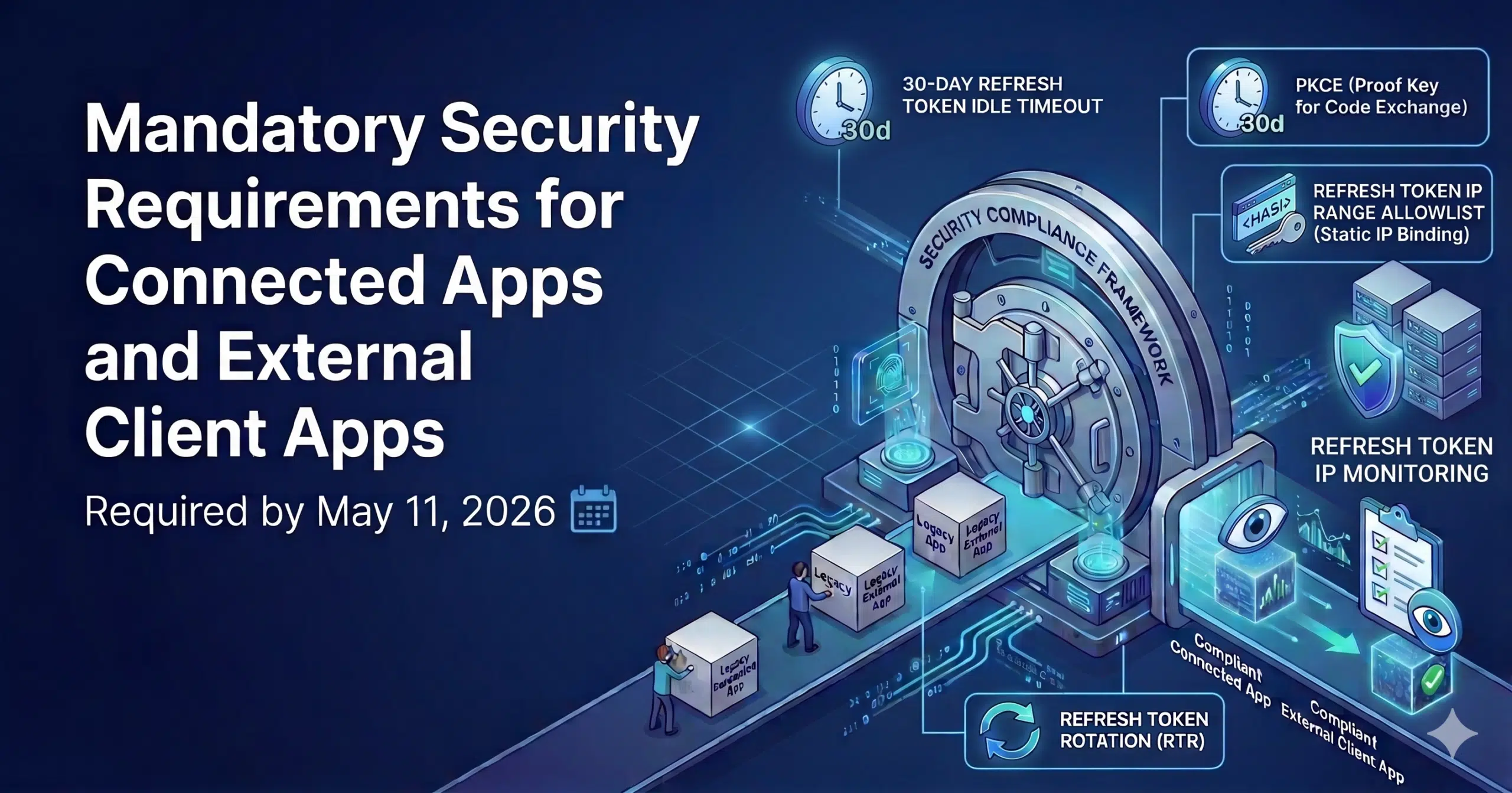
The message, paraphrased: by May 11, 2026, every Connected App or External Client App provided by an AppExchange partner and in use across more than two production orgs must implement a new set of mandatory security controls. Failure to comply may result in the Partner Application’s AppExchange de-listing and/or Salesforce’s temporary or permanent suspension of the Partner Application’s interoperation with Salesforce’s services.
Read that last sentence twice. That is not a roadmap memo. That is a hard deadline with a suspension clause attached.
In the conversations I’ve had since, the reactions from partner leadership have clustered into three groups:
- The partners who read it carefully, opened a Jira ticket, and started scoping.
- The partners who skimmed it, thought “probably a config change” and moved on.
- The partners who haven’t opened it yet because they were in a board meeting.
If you’re in group 2 or 3, this post is for you. Because this is not a config change. It’s a multi-workstream engineering program with a hard deadline, and the scope is bigger than most partners I’ve spoken to initially assumed.
TL;DR:
– May 11, 2026 is a hard deadline. AppExchange listing and platform interoperability are at risk.
– Every Connected App and ECA you provide is in scope, whether it’s packaged or not.
– This is a code + infrastructure + packaging + rollout project, not a settings toggle.
– After you build it, you still have to get every existing customer to re-authenticate.
Let’s walk through what’s actually being asked, why Salesforce is asking for it now, and what a realistic plan looks like.
A 30-Second Self-Check
Does any of the following describe your product? Then May 11 is on your roadmap whether you’ve planned for it or not.
- You ship a Connected App or ECA inside your managed package.
- Your implementation guide documents a Connected App for subscribers to create themselves.
- Your onboarding installs a Connected App as unpackaged metadata during setup.
Any yes puts you in scope.
What Salesforce Is Actually Requiring
Salesforce is mandating five security controls across every Connected App (CA) and External Client App (ECA) that AppExchange partners ship.
At the executive level, here is what each control does and what it asks of your engineering team:
| Control | What it does | What your team has to build |
|---|---|---|
| PKCE (Proof Key for Code Exchange) | Binds the initial OAuth request to the final token exchange. Neutralizes authorization code interception. | Code verifier/challenge generation and validation in the OAuth flow. |
| Refresh Token Rotation (RTR) | Issues single-use refresh tokens. When a token is used, a new one is issued and the old one is invalidated. | New token storage logic after every exchange. Race condition handling in multi-threaded workloads. |
| 30-day Refresh Token Idle Timeout | Idle refresh tokens die after 30 days of non-use. | A heartbeat service for infrequent integrations, or scheduled token refresh every 25–28 days. |
| Refresh Token IP Range Allowlist (Static IP Binding) | Refresh tokens can only be used from pre-approved IP ranges. | Static IPs across your integration infrastructure. Coordination with Salesforce to register them. |
| Refresh Token IP Monitoring | Alerting on suspicious token usage and geographic anomalies. | Operational monitoring. No code changes, but review discipline. |
Each line in the right-hand column is development work. Not configuration. Not metadata. Code in your application, changes in your cloud infrastructure, and new operational runbooks.
And that’s before you touch the Connected App itself.
Why Salesforce Is Doing This Now
The timeline feels aggressive. It is aggressive. But it isn’t bureaucratic — it’s reactive.
2025 was the worst year for Salesforce customer data in the platform’s history, and OAuth Connected Apps were the attacker’s weapon of choice. ShinyHunters (UNC6040) social-engineered employees at Google and Workday into approving malicious Connected Apps masquerading as Data Loader. The Salesloft Drift supply-chain attack compromised OAuth tokens across 700+ Salesforce tenants through a single trusted integration. In November, Salesforce pulled Gainsight-published apps from AppExchange and revoked all active tokens after another OAuth compromise. By April 2026, attackers were publicly claiming 3M+ records from a Cisco-attributed incident.
Every one of these breaches shared a shape: the attacker didn’t break Salesforce. They walked in through an OAuth connection.
Each of the five mandated controls maps to a specific technique used in a 2025 breach. PKCE closes the code-interception vector. Refresh Token Rotation neutralizes stolen tokens on first reuse. The 30-day idle timeout kills the dormant-token scenario. Static IP binding makes an exfiltrated refresh token useless from any location the attacker isn’t already inside.
The timeline is aggressive because the threat landscape is aggressive. Salesforce isn’t ahead of the market on this. It’s catching up.
The Scope Is Bigger Than Most Partners Think
Here is where, in my experience, most partner conversations take a turn.
The instinct — especially if your current packaging is tidy — is to think: “We have one Connected App in our managed package. We’ll update it, ship a new version, done.”
Unfortunately, the scope is broader than that.
All Connected Apps you provide are in scope, packaged or not. The Salesforce requirement doesn’t apply only to CAs bundled inside your managed package. It applies to any CA or ECA that is “included or used in connection with a Partner Application, provided or created by the Partner, and in use by more than 2+ customer production orgs.” That includes:
- Connected Apps inside your managed package.
- Connected Apps installed as unpackaged metadata during implementation.
- Connected Apps documented in your implementation guide for customers to create themselves.
- Connected Apps running on your side of the integration, living in your Partner Business Org, Namespace Org, or any org you use to mint credentials.
The “customer creates the Connected App post-install” pattern is effectively dead. For any flow that requires the ISV to hold the Consumer Key — JWT Bearer being the most common example for server-to-server integrations — the guidance is clear: documenting this for the subscriber to do post-install will fail AppExchange Security Review. If your ISV needs the credentials, you must package the ECA and distribute it. No more install guides that say “now go to Setup → Connected Apps and create one with these settings.”
Uninstalled Connected Apps are not a loophole. If your product relies on a Connected App installed via unmanaged metadata during onboarding, Salesforce Support has confirmed these still need to meet the PKCE and RTR requirements. A hard retirement date for this pattern hasn’t been published yet, but the direction is unambiguous: they’re being phased out.
New Connected Apps can no longer be created. As of Spring ’26, creation of new legacy Connected Apps is disabled by default. If your migration plan requires a brand-new CA for some edge case, that path is already closed without a support override. You’re building ECAs from here on.
ECAs require 2GP. This is the dependency a lot of 1GP ISVs haven’t fully internalized. ExternalClientApplication and ExtlClntAppOauthSettings metadata cannot be added to a 1GP managed package. If you’re still on 1GP and you need a packaged ECA, you’re running a 1GP-to-2GP migration in parallel with your CA-to-ECA migration, and both have to land before May 11. (We wrote about the 1GP-to-2GP business case here — worth a read if you’re still debating the timing.)
If any of those bullet points describe your situation, your scope just expanded.
Why This Is a Development Project, Not a Configuration Change
Once the scope is clear, the next surprise is usually the shape of the work. Partners tend to underestimate how much of this lives outside the Connected App metadata.
Your application code needs real changes. PKCE requires the code verifier/challenge handshake on every OAuth flow. RTR requires your token store to persist the new refresh token after every exchange — and if you have multiple workers hitting the same Salesforce tenant, you now have a distributed-systems problem around token locking. Get that wrong and you’ll see intermittent authentication failures in production that are genuinely hard to debug.
Your infrastructure needs static IPs. If your integration runs on AWS, GCP, or Azure, you may currently be using elastic or dynamic egress. Moving to a static IP range means NAT gateways, Elastic IPs, egress controllers, or a dedicated proxy layer — and then coordinating with Salesforce Support to register those ranges, one at a time, without removing the old ones until the new ones are confirmed active. This is cloud engineering work on your side of the integration, not Salesforce work.
Your infrequent integrations need a heartbeat. The 30-day idle timeout means any integration that might sit idle for longer — a rarely-used customer, a seasonal workload, a backup flow that only fires on certain conditions — will silently lose its refresh token. The fix is a lightweight heartbeat service refreshing tokens every 25–28 days. That’s new infrastructure with its own health monitoring.
Your ECA origin org becomes a critical dependency. When you package an ECA, you generate the global Consumer Key in your Dev Hub (or equivalent packaging org) and that org becomes the source of truth for every subscriber’s credentials via Salesforce’s global replication. If you lose access to that org, deactivate the ECA, or delete it — every subscriber breaks. That has implications for org governance, MFA enforcement, user offboarding, and backup that most partners have never had to think about for a Connected App.
What the Official Guidance Doesn’t Tell You (Yet)
Partners who’ve been in the Partnerblazer Slack and on the phone with Salesforce Support over the past few weeks are seeing three consistent patterns.
The scope guidance is inconsistent. Ask three people at Salesforce — support rep, partner account manager, someone at office hours — whether a specific kind of Connected App is in scope, and you’ll often hear three different answers. Uninstalled CAs, subscriber-created CAs, CAs used only in your staging environments — each of these has prompted conflicting guidance depending on the source. This is normal for a rollout this size three weeks in. The safest default: if your product relies on it and customers are using it, assume it’s in scope and plan accordingly.
Two of the five controls landed late. The Refresh Token Idle Timeout and IP Range Allowlist settings became available to partners in April, roughly four weeks before the deadline. Documentation at release was thin, and the edge cases partners care about (infrequent integrations, multi-region deployments, failover scenarios) aren’t fully covered in public docs. If your team is estimating from official material alone, expect discovery time.
Tooling has rough edges. We’ve seen secret rotation error out for packaged ECAs in specific configurations — the kind of issue you only find by trying it. The ECA metadata has case-sensitive retrieval quirks in the Salesforce CLI. .forceignore patterns for packaged vs non-packaged ECA metadata are easy to get wrong and produce opaque packaging errors. None of these are showstoppers, but each one burns a day or two the first time you hit it.
None of this is a reason to wait. It’s a reason to plan for discovery time in your estimate — and a reason to lean on people who’ve already hit the walls.
The Rollout Is Its Own Project
Here is the part that catches even disciplined engineering teams off guard. Assume, optimistically, that by end-April you have a new package version ready. Code is updated. Infrastructure has static IPs. ECAs are packaged. Everything passes internal testing.
You are roughly halfway done.
Now, every existing customer must re-authenticate to establish a new handshake between your service and their org. That means a coordinated rollout with several moving pieces:
- Customer communication. Every existing customer needs advance notice, a downtime window (even if small), clear instructions, and a support channel.
- The re-authentication handshake. In most flows this is a one-time action, but it requires someone on the customer side to do it. Large enterprise customers move slowly. Some will need a scheduled maintenance window.
- Post-deployment monitoring. You’re watching authentication success rates, IP mismatches, token rotation failures, and RTR race conditions under real production load.
- Legacy deprecation. Only after every customer is on the new ECA can you remove the legacy Connected App from your package. Until then, you’re maintaining both.
If you have 500 customers, the re-authentication phase alone is a multi-month program run by customer success and support, not engineering. If you’re enterprise-heavy, with customers who don’t touch their integrations between QBRs, expect a long tail.
Where Aquiva Labs Fits In
I’ll be direct. This is a significant body of work, landing in a narrow window, in a year where most engineering teams already have Agentforce on their roadmap, AgentExchange positioning to figure out, and probably more than one customer escalation demanding attention.
We’re hearing a consistent message from partners: “We understand what needs to happen. We don’t have the bench to do it on this timeline without dropping something else.”
That’s the gap Aquiva Labs is built for. As a Salesforce Summit Partner and Expert PDO, we’ve already delivered Connected App to External Client App migrations for AppExchange partners — with the full scope of work: code changes in the partner’s external application, 1GP-to-2GP migration where it was a blocker, static IP infrastructure changes in AWS/GCP, ECA packaging, Security Review re-submission, and the customer rollout plan. We’ve seen which parts move fast and which parts surface the surprises.
If your engineering bench is already committed, we can act as the delivery team on this program and keep your internal roadmap intact. If your team wants to lead it but needs specialist help on specific workstreams — packaging, infrastructure, or the rollout program — we can plug in there.
If You’re Reading This After May 11
You are not without options — but your options narrow. Salesforce will continue to offer office hours and support channels. Partners in flight will not be delisted the same day. But the conversation shifts from “we’re on track” to “we’re explaining why we’re late.” That’s a different conversation with your customers, your security teams, and your Salesforce account team.
The better version of this story is the one where you ship early, your customers re-authenticate on your schedule rather than Salesforce’s, and your AppExchange listing stays where it is.
Need Help Shipping Your Connected App to External Client App Migration?
We’ve done this work for other AppExchange partners. We can scope yours in a short conversation and tell you honestly whether the timeline is still achievable with your current plan — and what to change if it isn’t.
Author

Jakub Stefaniak
Field CTO, Salesforce CTA